





In today’s Nigeria, getting a job is a full-time hustle on its own. But the first barrier is always the same: “Send your CV.” And that’s where many young people get stuck.
No laptop.
No data for online CV builders.
No extra ₦2,000 to pay a café guy who may just recycle a CV from 2018.
Step-by-Step: Create Your CV Like a Pro Using Only Your Phone

Step 1: Use Microsoft Word App or Google Docs (Both Are Free)
Download either from your Play Store or App Store:
- Microsoft Word (free version is enough)
- Google Docs (free, and works offline too once downloaded)
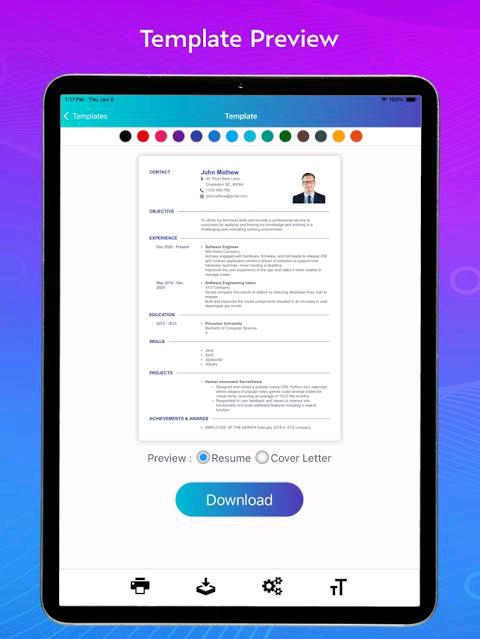
These apps have free CV templates built in. Just open the app, search for “CV” or “resume” templates, and you’ll find a layout ready to edit.
No formatting stress.
No technical headache.
Step 2: Choose the Right Format (Don’t Copy the Wrong Style)
Pick a clean, simple CV format — avoid styles with too many colours, images, or fancy fonts. In Nigeria, employers want clarity, not drama.
For fresh graduates or job seekers, use this format:
- Full Name
- Phone & Email
- Career Summary (2–3 lines about you and your goals)
- Education
- Skills
- Work Experience / Volunteering
- Certifications
- Referees (Optional)
You can delete any section that doesn’t apply for now. Just focus on what you do have, not what’s missing.
Step 3: Use Your Phone’s Keyboard Efficiently
Turn your phone sideways (landscape mode) while typing — it gives a wider view. Use auto-correct and grammar suggestions, but still proofread properly.
If your phone keyboard doesn’t help much, download Grammarly Keyboard — it suggests corrections in real time.
Step 4: Save As PDF (Not DOCX)
Once done editing, click “Save As” or “Share As” and choose PDF format. That’s what recruiters expect — not Word documents that may scatter on their end.
Name your file like this:
CV_Adekunle_Taiwo_June2025.pdf — looks serious and professional.
Step 5: Upload to Google Drive or Your Email
Don’t just save it on your gallery or WhatsApp. Upload it to:
- Your Google Drive
- Your own Gmail Draft
- Or save it on your Telegram ‘Saved Messages’
This way, you can send your CV anytime, even if your phone crashes — and you’ll never say “My CV is on my other phone.”
Bonus: Best Free CV Apps That Work in Nigeria
If you don’t want to start from scratch, try these apps:
- Canva (has free CV templates — editable on phone)
- Resume Builder by Intelligent CV
- Zety Resume Builder (limited free export)
- LinkedIn App — create profile, download as CV
Just remember: avoid any app that forces you to pay before download.
What to Avoid
❌ Never use WhatsApp to type your CV — formatting will break.
❌ Avoid coloured backgrounds or emojis.
❌ Don’t lie on your CV — employers verify these days.
❌ Don’t send Word files — always convert to PDF.
Final Tips
- Use simple fonts like Arial or Calibri — readable, clean, classic.
- Keep it 1 page if you’re a fresh graduate or entry-level applicant.
- Update it monthly — even if it’s just one line you add.
- Test it by sending to your own email first — make sure formatting holds.
 We do everything possible to supply quality news and information to all our valuable readers day in, day out and we are committed to keep doing this.
Your kind donation will help our continuous research efforts.
-Advertisement-

-Want to get the news as it breaks?-